
Type 1 vs Type 2 Hypervisors: What's the Difference?
Learn the difference between Type 1 and Type 2 hypervisors, how bare-metal virtualization works, and which architecture is used for different workloads.
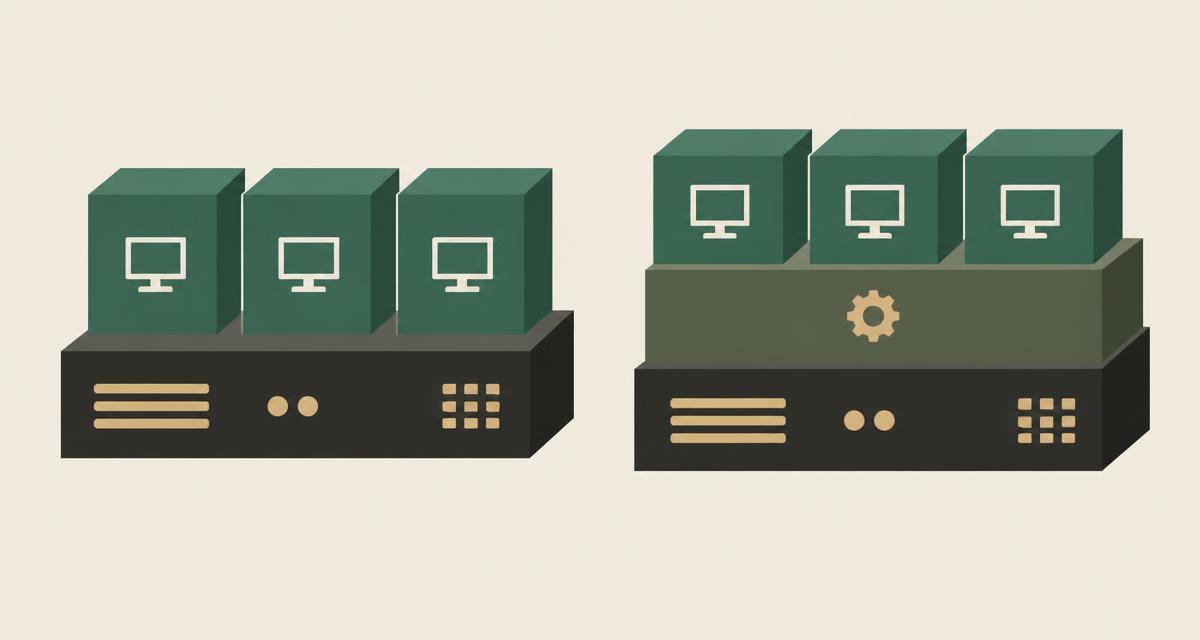
The Type 1 vs Type 2 hypervisor distinction describes where the virtualization layer runs. A Type 1 hypervisor runs directly on the server hardware and is used for data center and server virtualization. A Type 2 hypervisor runs as an application on a desktop or laptop operating system and is used mainly for development, testing and labs. This guide explains both, where bare-metal hypervisors fit, and why some modern hypervisors such as KVM do not fit neatly into either box.
What is a hypervisor?
A hypervisor is the software that creates and runs virtual machines. It lets one computer run multiple operating systems at the same time, each inside its own VM, while they share the same physical hardware.
The hypervisor divides hardware resources — CPU time, memory, storage and network access — between VMs and keeps each guest operating system isolated from the others. How it does that, and what sits between it and the hardware, is what separates the two types. For the broader picture, see what server virtualization is.
What is a Type 1 hypervisor?
A Type 1 hypervisor is installed directly on the physical server, without a general-purpose operating system underneath. It controls the hardware itself and schedules VMs onto it. This is why Type 1 hypervisors are also called bare-metal hypervisors.
Type 1 hypervisors are the standard choice for enterprise server virtualization. They are designed for continuous operation, clustering, high availability and remote management, and they are typically managed centrally rather than from a local screen.
What is a Type 2 hypervisor?
A Type 2 hypervisor — also called a hosted hypervisor — runs as an application on top of an existing operating system such as Windows, macOS or a Linux desktop. The host OS manages the hardware, and the hypervisor requests resources from it.
Type 2 hypervisors are convenient for individual use. Common scenarios include:
- Developers running test environments on a laptop
- Testing software on several operating systems
- Desktop use, such as running an application that needs another OS
- Training labs and proof-of-concept experiments
Type 1 vs Type 2 hypervisors
The comparison below reflects typical designs; individual products vary.
| Aspect | Type 1 (bare metal) | Type 2 (hosted) |
|---|---|---|
| Architecture | Runs directly on server hardware | Runs as an application on a host OS |
| Typical workload | Production servers and data center workloads | Development, testing and desktop VMs |
| Performance considerations | Usually lower overhead, as no general-purpose OS sits in between | Shares resources with the host OS and its applications |
| Isolation model | Hypervisor controls hardware and isolates VMs | Isolation also depends on the host OS |
| Common use case | Clusters, private cloud, server consolidation | Individual workstations and labs |
| Management approach | Centralized, remote, API-driven | Local application interface |
| Deployment environment | Data center or dedicated servers | Laptops and desktops |
- Virtual machines
- Hypervisor
- Server hardware
- Virtual machines
- Hypervisor application
- Host operating system
- Computer hardware
- Virtual machines
- Linux kernel with KVM
- Server hardware
It is tempting to say Type 1 is always faster, but real performance depends on hardware support, drivers, storage, configuration and workload. Hardware-assisted virtualization has narrowed many historical gaps.
What are bare-metal hypervisors?
"Bare metal" simply means the hypervisor is the first software layer on the hardware. Because it is not competing with a desktop operating system, it can dedicate the machine to running VMs, reduce the attack surface and be managed as infrastructure.
Bare-metal hypervisors form the base of most data center and private cloud designs, where many hosts are clustered and managed together.
Where does KVM fit?
KVM is built into the Linux kernel. When enabled, the Linux kernel running directly on the server acts as the hypervisor, and VMs use the processor's virtualization extensions. From that perspective KVM behaves like a bare-metal, Type 1-style hypervisor and is used that way in enterprise and cloud environments.
At the same time, the host is a full Linux system and each VM runs as a Linux process, which is closer to how Type 2 hypervisors are often described. The simplified historical model does not map perfectly to this design, and that is fine — the classification matters less than capabilities such as performance, isolation, hardware support and management. Our guide to the KVM hypervisor explains the architecture in more depth.
Hypervisors and different types of virtualization
Hypervisors are central to server virtualization, but the word "virtualization" covers several distinct concepts:
- Server virtualization: running multiple server VMs on shared physical hosts.
- Desktop virtualization: delivering desktop environments from central infrastructure to users.
- Application virtualization: packaging or streaming applications so they run separately from the underlying OS.
- Storage virtualization: pooling physical storage devices into logical storage presented to hosts and VMs.
These are different technologies with different tools. VirtuWa focuses on server virtualization and private cloud infrastructure; it does not provide desktop or application virtualization products.
What should businesses consider when choosing a hypervisor?
For production server workloads, the hypervisor type is only the starting point. Evaluate the complete platform around it:
- Hardware compatibility with your servers, storage and network
- Centralized management and API access
- High availability, live migration and resource scheduling — see HA vs DRS vs live migration
- Networking and storage integration
- Backup and disaster recovery options
- Automation and infrastructure-as-code support
- Operational skills available in your team
- Vendor support model and licensing
- Migration requirements from your current platform
VirtuWa and server virtualization
Asas HV is VirtuWa's server virtualization foundation, built on KVM, QEMU and libvirt and deployed directly on server hardware. Together with centralized management, migration, backup/DR and automation across the VirtuWa platform, it is designed for production data center and private cloud workloads. To see how virtualization grows into a managed service, read virtualization vs private cloud.
Explore Asas HV
See how VirtuWa's KVM-based hypervisor supports production server workloads.
Explore Asas HVWhat Is KVM? Understanding Linux Virtualization
Learn how KVM works, how it relates to Linux, QEMU and libvirt, and why KVM has become a foundation for modern server virtualization and private clouds.
Read articleWhat Is Server Virtualization? How It Works and Why It Matters
Learn what server virtualization is, how virtual machines share physical hardware, and how it improves resource utilization, flexibility and data center operations.
Read articleHA vs DRS vs Live Migration: What's the Difference?
HA, DRS and live migration solve different virtualization challenges. Learn how they support availability, VM mobility and resource optimization.
Read articleVirtualization vs Private Cloud: What's the Difference?
Virtualization and private cloud are closely related but not the same. Learn how they differ and what management, automation and cloud capabilities add.
Read article