
Virtualization vs Private Cloud: What's the Difference?
Virtualization and private cloud are closely related but not the same. Learn how they differ and what management, automation and cloud capabilities add.
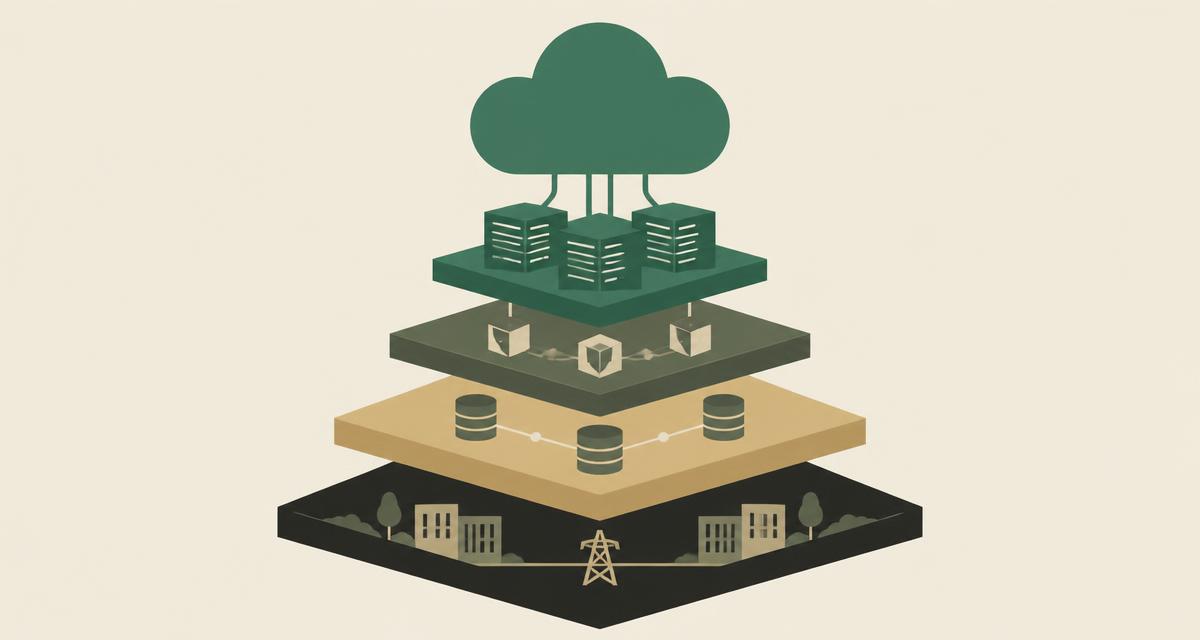
Virtualization is often the foundation of a private cloud, but the two terms are not interchangeable. In the virtualization vs private cloud discussion, virtualization is the technology that turns physical servers into virtual machines; private cloud is the operating model that turns that virtualized capacity into a managed, automated, governed service. Understanding the difference helps teams decide what they actually need — and avoid calling a set of hypervisors a cloud.
What is virtualization?
Virtualization abstracts physical hardware so that one server can run several isolated virtual machines, each with its own operating system. A hypervisor shares CPU, memory, storage and networking between them. If you are new to the topic, our guide to server virtualization covers how it works in detail.
On its own, virtualization answers the question "how do I run many workloads efficiently on shared hardware?" It does not, by itself, answer how those workloads are requested, approved, governed, automated or charged back.
What is a private cloud?
A private cloud is cloud-style infrastructure dedicated to one organization, whether it runs in its own data center or in a dedicated hosted environment. It delivers compute, storage and networking as a service — with self-service, APIs, policies and automation — while the organization keeps control over location, security and operations.
The key idea is the operating model. Users and teams consume infrastructure through defined services instead of raising tickets for every VM, and administrators manage policies and capacity instead of individual servers.
Virtualization vs private cloud at a glance
The following comparison shows what typically changes when a virtualized environment becomes a private cloud.
| Area | Virtualization | Private cloud |
|---|---|---|
| Primary purpose | Run multiple VMs on shared hardware | Deliver infrastructure as a governed service |
| Virtual machines | Yes — the core capability | Yes — built on virtualization |
| Centralized management | Often per cluster or per host | Unified across clusters and sites |
| Automation | Limited or script-based | Standard templates, workflows and infrastructure as code |
| APIs | May exist for the hypervisor | Core interface for users and tooling |
| RBAC | Basic administrator roles | Granular roles, tenants and projects |
| Resource scheduling | Available within clusters | Combined with quotas and placement policies |
| Monitoring | Host and VM metrics | Service-level visibility and capacity planning |
| Backup / DR | Added separately | Integrated into the service design |
| Self-service | Rare | Common, within policy |
| Policy controls | Manual | Enforced by the platform |
| Operational model | Administrators manage servers | Platform team manages services |
Virtualization is the foundation
The easiest way to picture the relationship is as a stack. Each layer depends on the one below it, and private cloud is what emerges when all of them work together.
The choice of hypervisor matters at the foundation layer. Many private clouds today are built on the KVM hypervisor because of its openness, Linux integration and automation support.
What does private cloud add to virtualization?
Moving from virtualization to private cloud usually means adding or formalizing these capabilities:
- Centralized management across hosts, clusters and locations
- Automation of provisioning, configuration and lifecycle tasks
- APIs so that tools and teams can request resources programmatically
- RBAC and multi-tenancy to control who can do what
- Monitoring and capacity planning at service level
- Orchestration of multi-VM applications and networks
- Resource scheduling combined with quotas and placement rules
- Backup and disaster recovery built into the service
- Standardized deployment from approved templates
Is a virtualized data center automatically a private cloud?
Not necessarily. Many organizations run large virtualized environments that are still operated in a traditional way: VMs are requested by ticket, built by hand, and managed individually. That is efficient virtualization, but it is not yet a private cloud.
A useful test is to ask whether a team can obtain a correctly configured, policy-compliant environment through a defined service or API, without manual intervention for each step. If the answer is no, the environment is virtualized but not cloud-operated.
When is virtualization enough?
For smaller or stable environments — a handful of hosts, a limited set of applications and a small administration team — well-managed virtualization is often sufficient. The overhead of building self-service catalogues and multi-tenant policies may not pay off when change is infrequent.
Even here, basic capabilities such as high availability, monitoring and reliable backups are worth having. See HA vs DRS vs live migration and snapshot vs backup vs disaster recovery for what each protects against.
When does private cloud make sense?
Private cloud becomes valuable when operational complexity grows. Typical signals include:
- Multiple hosts, clusters or data center locations
- Many teams requesting infrastructure regularly
- A need for consistent, repeatable provisioning
- Governance requirements around access, audit and data location
- A desire to automate deployment through infrastructure as code
- Internal service providers or MSPs serving several business units or customers
How VirtuWa connects virtualization and private cloud
The VirtuWa platform is designed to cover both layers. Asas HV provides the KVM-based virtualization foundation. Lejam Cloud Manager adds centralized management, RBAC and audit logging. Jisir brings existing workloads across, Hemaya protects them with backup and disaster recovery, and Mehad supports deployment and automation.
Organizations can start with virtualization and grow into private cloud operations at their own pace, without replacing the foundation.
Explore the VirtuWa Platform
See how virtualization, management, migration, protection and automation fit together.
Explore the platformWhat Is Server Virtualization? How It Works and Why It Matters
Learn what server virtualization is, how virtual machines share physical hardware, and how it improves resource utilization, flexibility and data center operations.
Read articleWhat Is KVM? Understanding Linux Virtualization
Learn how KVM works, how it relates to Linux, QEMU and libvirt, and why KVM has become a foundation for modern server virtualization and private clouds.
Read articleHA vs DRS vs Live Migration: What's the Difference?
HA, DRS and live migration solve different virtualization challenges. Learn how they support availability, VM mobility and resource optimization.
Read articleVM Snapshot vs Backup vs Disaster Recovery: What's the Difference?
Snapshots, backups and disaster recovery solve different problems. Learn how each protects virtual machines and why snapshots should not replace backups.
Read article